


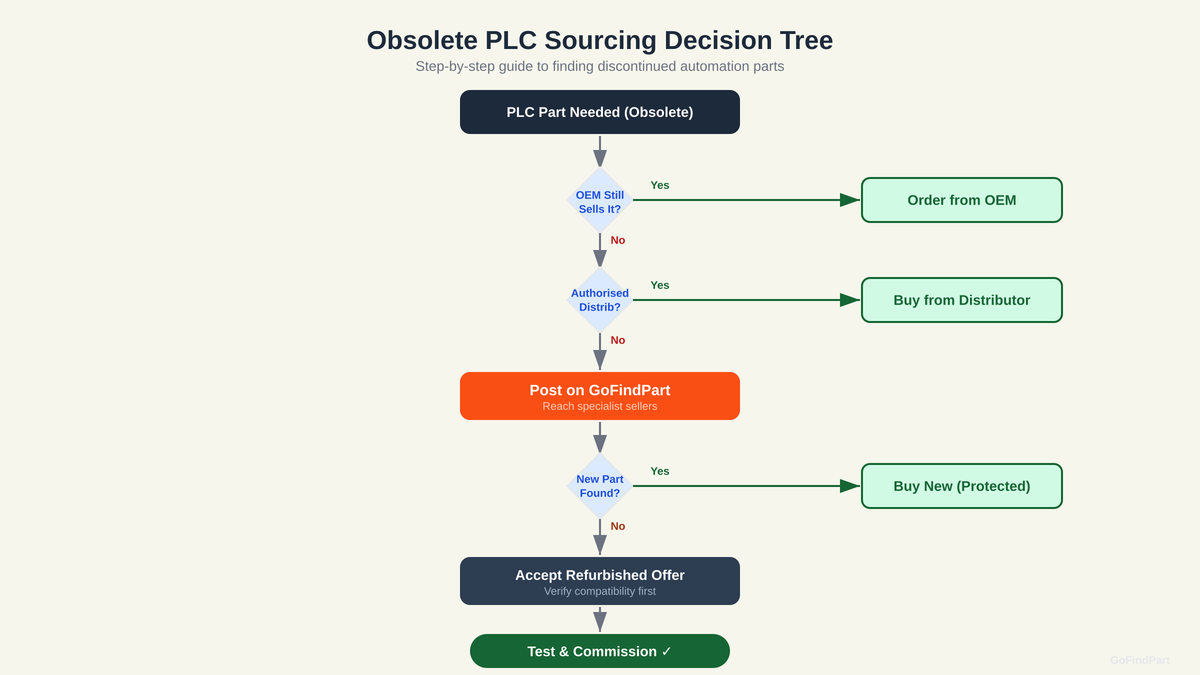
Always specify whether you will accept refurbished or remanufactured modules. For obsolete parts, tested refurbished units are often the only option and can be sourced much faster than hunting for new-old-stock. Reputable refurbishers test modules to manufacturer specifications before resale.
Programmable logic controllers have an uncomfortable lifecycle mismatch with the machines they control. A PLC platform might be discontinued after 10 to 15 years, but the machines it controls can run for 30 years or more. When a CPU module, I/O card, or communication module fails on a discontinued PLC, finding a replacement becomes a sourcing challenge.
This guide covers the practical steps for sourcing obsolete PLC parts when your production depends on finding one quickly.
Step 1: Identify Exactly What You Need
PLC modules are identified by precise catalogue numbers that encode the module type, I/O count, communication protocol, and firmware revision. The number printed on the front of the module is your starting point. For example, a Siemens 6ES7 315-2AH14-0AB0 tells you it is an S7-300 CPU 315-2DP with specific firmware.

Example of a well-specified PLC request. Part: Siemens S7-300 CPU module, catalogue number 6ES7 315-2AH14-0AB0. Quantity: 1. Urgency: CRITICAL. Notes: firmware V3.3 or compatible; will accept refurbished if tested; current module shows LED fault code SF (system fault); needed to restore production on packaging line 3.
Note the firmware version if visible — some PLC modules are firmware-specific and a newer revision may not be backwards-compatible with your existing program. Also record whether you need just the CPU or the entire rack assembly.
Note

Step 2: Check Cross-References
Manufacturers often release updated versions of discontinued modules. Siemens, Allen-Bradley, Mitsubishi, and Omron all publish migration guides that map old part numbers to current equivalents. Before sourcing, check whether a currently-manufactured replacement exists that is plug-compatible with your existing rack and program.
Be cautious with cross-references though. A physically compatible module may require program modifications, different wiring, or updated configuration software. If you need a drop-in replacement with zero changes, specify this clearly in your request.

Step 3: Cast a Wide Net
Obsolete PLC parts exist in a fragmented market. Specialist dealers hold old stock, decommissioned machines yield spare modules, and surplus inventory from factory closures creates unpredictable supply. The best way to find these parts is to broadcast your need to as many relevant suppliers as possible simultaneously.
A reverse auction is ideally suited to this because it reaches multiple specialist suppliers at once. Post your request with the exact catalogue number, acceptable condition (new, refurbished, or tested used), and your urgency level. Suppliers who have the part in stock can respond immediately; those who can source it will indicate their timeline.
Step 4: Verify Before Installing
When the replacement arrives, verify the catalogue number matches exactly. For CPU modules, check the firmware version. Power up the module on a test bench if possible before installing it in the production system. This extra step takes 15 minutes but can prevent a second failure if you have received a faulty refurbished unit.
PLC Module Failed?
Post your PLC part number and reach specialist obsolete parts suppliers across the UK.
Find PLC Parts

